

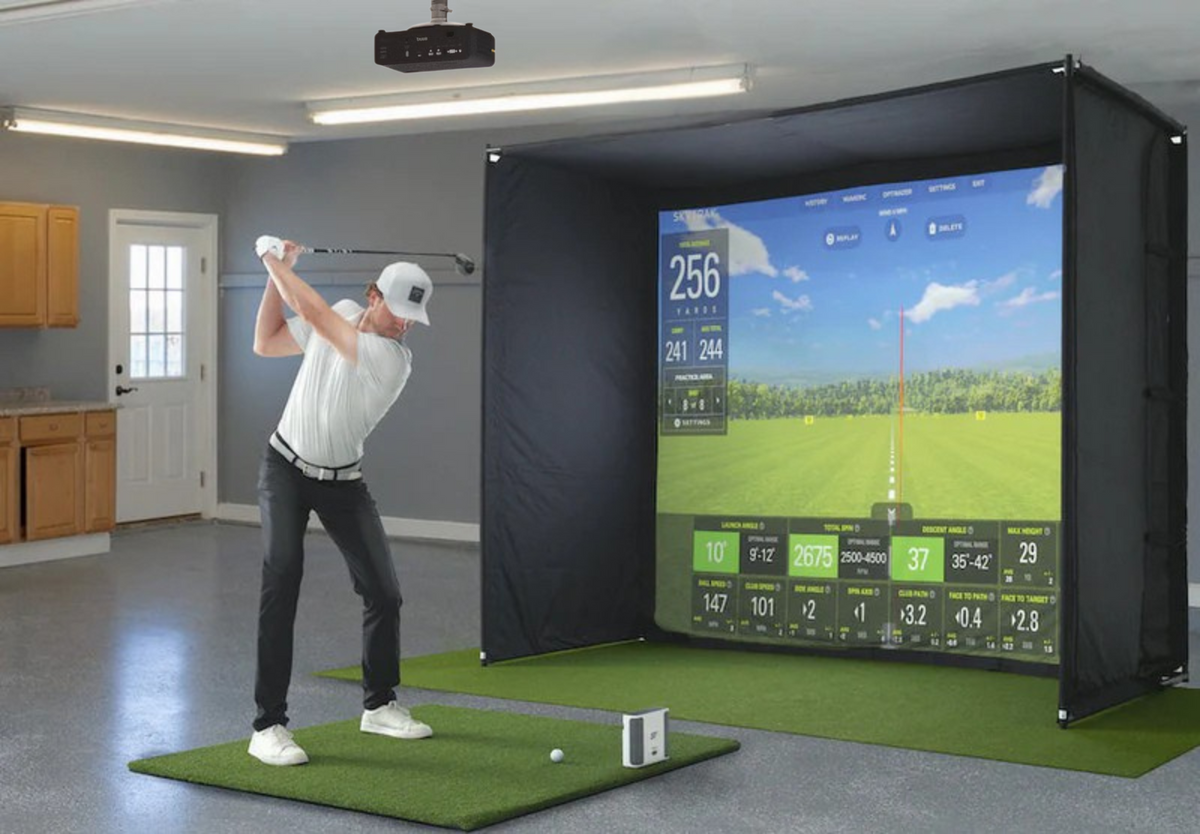
If you have approximately $10,000 CAD to spend on a golf simulator, you can build an impressive home setup with quality equipment throughout.
A budget in this range can accommodate a capable launch monitor, full enclosure, projector, hitting mat, landing turf, and potentially a dedicated gaming PC. The key is deciding where your money will have the biggest impact.
Some golfers prioritize launch monitor performance and practice data. Others want a larger screen and immersive projected experience. Your room dimensions will also influence which equipment makes sense.
So, what is the best golf simulator around $10,000 in Canada?
There isn't one configuration that's right for everyone. Here's how we'd approach the budget.
What Should a $10,000 Golf Simulator Include?
A well-planned setup can potentially include:
- Launch monitor
- Golf simulator enclosure and impact screen
- Projector
- Quality hitting mat
- Landing turf
- Gaming PC or compatible device
- Golf simulator software
- Mounting hardware and accessories
The launch monitor you choose will have a major impact on the rest of the budget.
Spend $2,500–$3,000 on tracking technology and you'll have considerably more room for your enclosure, projector, PC, and hitting area. Choose a $4,000–$5,000 launch monitor and you'll need to allocate the remaining budget more carefully.
Neither approach is necessarily better. It depends on your priorities.
Choosing Your Launch Monitor
Your launch monitor should be one of your first decisions because it influences your room requirements, software compatibility, computer requirements, hitting position, and remaining budget.
Here are several options worth considering.
SkyTrak ST MAX
The SkyTrak ST MAX is well suited to dedicated indoor simulators.
Because it operates beside the hitting area rather than several feet behind the golfer, it can be particularly useful where room depth is limited.
Its price also leaves a healthy portion of a $10,000 budget available for an enclosure, projector, hitting surface, and other equipment.
Best for: Dedicated indoor simulators, limited-depth rooms, and balanced complete setups.
Uneekor EYE MINI Lite
The Uneekor EYE MINI Lite is another strong choice for a permanent indoor simulator, particularly for golfers planning a PC-based setup.
It allows you to invest meaningfully in tracking technology while maintaining enough budget for the rest of the room.
Best for: Permanent indoor simulators, PC-based setups, practice, and virtual golf.
Uneekor EYE MINI
The Uneekor EYE MINI can make sense if you want to allocate more of your budget toward the launch monitor.
You'll have less money available for the enclosure, projector, PC, and flooring, but that trade-off can be worthwhile for golfers prioritizing their tracking technology.
Best for: Practice-focused golfers and buyers who want to invest more heavily in their launch monitor.
Bushnell Launch Pro
The Bushnell Launch Pro is another option for golfers who want the launch monitor to be one of the premium components in their setup.
Because it takes up a larger percentage of the budget, planning the complete system before purchasing becomes especially important.
Three Ways to Build a $10,000 Golf Simulator
Option 1: Best All-Around Setup
Goal: Build a balanced simulator without sacrificing any major component.
A balanced setup could include:
- Quality camera-based launch monitor
- Full simulator enclosure
- 1080p short-throw projector
- Quality hitting mat
- Landing turf
- Compatible computer
- Simulator software
For many home golfers, this is the approach we'd recommend.
Rather than putting an outsized portion of the budget into one product, you're creating a simulator that's equally capable for practice, virtual rounds, and entertaining.
Option 2: Best for Playing Courses
Goal: Create the most immersive virtual golf experience possible.
If playing virtual courses is your priority, consider putting more of the budget toward:
- Larger enclosure
- High-quality impact screen
- Short-throw projector
- Full landing turf
- Gaming PC
Pair these with a more affordable launch monitor to keep the overall build around $10,000.
This approach works particularly well for virtual rounds, winter golf, family use, and playing with friends.
Option 3: Best for Practice
Goal: Prioritize launch monitor performance and the hitting experience.
Consider spending more on the launch monitor while keeping other components simpler.
Your configuration might include:
- Higher-end launch monitor
- Quality hitting mat
- Appropriately sized enclosure
- 1080p projector
- Basic landing turf
- Existing gaming PC where possible
This is particularly appealing for golfers focused on club gapping, distance control, ball flight analysis, and regular practice.
Camera vs. Radar Launch Monitors
Your room can help make this decision.
Camera-based launch monitors positioned beside the ball can work particularly well in basements, dedicated simulator rooms, and other spaces where depth is limited.
Radar-based launch monitors positioned behind the golfer generally require more room depth and can be better suited to larger garages or deeper simulator rooms.
Always check the manufacturer's specific indoor space requirements before purchasing.
Choosing Your Enclosure
Don't choose an enclosure based purely on the biggest size your budget allows.
Consider:
- Available width and ceiling height
- Enclosure depth
- Swing clearance
- Golfer position
- Projector location
- Screen dimensions
- Desired aspect ratio
Ideally, your enclosure and projector should be planned together. Your screen determines the image size you're trying to create, while your projector needs to produce that image from the mounting position available in your room.
Fixed or Retractable?
A fixed enclosure generally makes the most sense for a dedicated simulator room.
A retractable simulator can be ideal when the room needs to serve multiple purposes, particularly in garages, home gyms, workshops, and shared recreational spaces.
Choosing the Right Projector
Resolution isn't the only consideration when choosing a golf simulator projector.
You also need to consider:
- Throw ratio
- Throw distance
- Brightness
- Aspect ratio
- Screen dimensions
- Mounting location
A projector with excellent specifications can still be wrong for your room if it can't produce the required image from your available mounting position.
For a deeper breakdown, see our Golf Simulator Projector Guide.
1080p or 4K?
For a simulator around $10,000, 1080p is still an excellent choice.
A quality 1080p projector can produce a sharp, immersive image while leaving more of your budget available for the launch monitor, enclosure, hitting surface, and PC.
4K can look fantastic, but the upgrade may also require a more capable gaming PC to run simulator software at higher resolutions.
If visual quality is one of your highest priorities, 4K may be worth building around. Otherwise, a strong 1080p setup can offer better overall value.
Do You Need a Gaming PC?
That depends on your launch monitor and simulator software.
Before purchasing a computer, determine:
- Which launch monitor you're using.
- Which software you want to run.
- What resolution you want to play at.
- What hardware the software recommends.
If you already own a capable gaming PC, you can put that portion of your budget toward another part of the simulator.
For more information, see our Do You Need a Gaming PC for a Golf Simulator? guide.
Don't Overlook the Hitting Surface
You'll potentially hit thousands of golf balls from the same spot, so the hitting mat shouldn't be treated as an afterthought.
Look for a hitting surface that provides:
- Comfortable impact
- Stability
- Durability
- Realistic turf interaction
Landing turf isn't essential, but it can create a cleaner transition between the hitting area and enclosure and give the room a more finished appearance.
Plan Your Software Before You Buy
Different golfers may prioritize virtual courses, driving ranges, practice modes, online play, graphics, or game modes.
Depending on your equipment, your options may include platforms such as:
- E6 Connect
- E6 Golf 26
- GSPro
- Awesome Golf
- Manufacturer-specific software
Compatibility varies by launch monitor and can change, so confirm current support before purchasing equipment specifically for one platform.
Our Best Golf Simulator Software guide provides a deeper comparison.
Measure Your Room First
Your simulator should be designed around your room.
Measure your:
Width: Enough space for the enclosure, hitting position, and swing.
Height: Enough clearance to comfortably make a full swing.
Depth: Enough room for the golfer, launch monitor requirements, enclosure, and projector.
Also account for garage tracks, lights, beams, bulkheads, windows, doors, and other obstacles.
Our Golf Simulator Room Size Guide covers this in greater detail.
Common $10,000 Golf Simulator Mistakes
Spending Too Much on One Component
The most expensive launch monitor you can afford isn't necessarily the best choice for the complete simulator.
Buying a Projector Before Planning the Screen
Know your screen dimensions and available mounting position first.
Assuming You Need 4K
4K is excellent, but a balanced 1080p simulator may provide better overall value.
Forgetting the PC
If your preferred software requires a gaming PC, include it in the budget from the beginning.
Ignoring Software Costs
Account for any software purchases, memberships, or subscriptions associated with your setup.
Is $10,000 Enough for a Great Home Golf Simulator?
Absolutely.
A budget around $10,000 gives you the flexibility to create a simulator that feels like a complete, purpose-built setup.
You can prioritize:
Practice: Spend more on your launch monitor and hitting surface.
Immersion: Allocate more toward the enclosure, screen, projector, and PC.
Balance: Choose quality equipment across every major category.
The right approach depends on how you're actually going to use your simulator.
Build Your $10,000 Golf Simulator Around You
There isn't one combination of products that qualifies as the best $10,000 golf simulator for every golfer.
Your ideal setup depends on:
- Your room
- Your preferred software
- Your practice goals
- Your visual expectations
- Your existing equipment
- Your budget
That's why a customized package can make more sense than choosing a fixed collection of products.
At PinPoint Golf Sims, you can select your launch monitor, enclosure, projector, hitting surface, and other components to create a simulator package built around your space and priorities.
Our Simulator Builder can help you compare your options and build a system that makes sense as a whole.
Frequently Asked Questions
What is the best golf simulator around $10,000?
The best setup depends on your priorities. A balanced $10,000 simulator could combine a camera-based launch monitor, full enclosure, 1080p short-throw projector, quality hitting mat, landing turf, and compatible computer.
Can you build a complete golf simulator for $10,000 CAD?
Yes. Approximately $10,000 CAD provides enough budget for many complete home golf simulator configurations, including the launch monitor, enclosure, projector, hitting surface, and other essential components.
How much should I spend on the launch monitor?
There isn't a universal amount. Spending approximately $2,500–$4,500 can leave room for a well-rounded simulator, while spending more may make sense if tracking technology is your main priority.
Should I get a 1080p or 4K projector?
1080p can provide an excellent simulator experience and leave more budget for other equipment. Consider 4K if visual quality is a major priority and your PC and overall budget support it.
Do I need a gaming PC?
Not necessarily. Your computer requirements depend on your launch monitor and simulator software. If you're planning to use PC-based software, include an appropriate gaming PC in your initial budget.
Can a $10,000 golf simulator fit in a garage?
Yes, provided the garage has sufficient width, height, and depth. Garage door tracks, openers, lighting, and temperature should also be considered.
Final Thoughts
A budget of approximately $10,000 CAD can build an excellent home golf simulator. Here are some pre-curated simulator packages to make the research a little easier.
The key isn't finding the most expensive product you can fit into the budget. It's creating a system where the launch monitor, enclosure, projector, hitting surface, computer, and software all work together.
Start with your room, decide how you'll use the simulator, and determine which features matter most.
From there, you can build a simulator designed around the way you want to practice and play—without spending money on upgrades that don't meaningfully improve your experience.

Share:
Best Golf Simulator Under $5,000 in Canada