


Build Your Own vs. Pre-Curated Golf Simulator Package: Which Is Right for You?
When you're shopping for a golf simulator, one of the biggest decisions isn't necessarily which launch monitor or projector to buy. It's how you want to build your simulator in the first place.
Do you want to choose each component yourself and create a completely custom setup? Or would you rather start with a pre-curated golf simulator package where the major components have already been selected to work together?
Both approaches have their advantages.
A custom build gives you maximum flexibility and control over your equipment and budget. A pre-curated package simplifies the process by taking much of the research and compatibility work out of your hands.
In this guide, we'll compare build-your-own golf simulators vs. pre-curated golf simulator packages, including customization, compatibility, cost, convenience, and who each option is best suited for.
What Is a Build-Your-Own Golf Simulator?
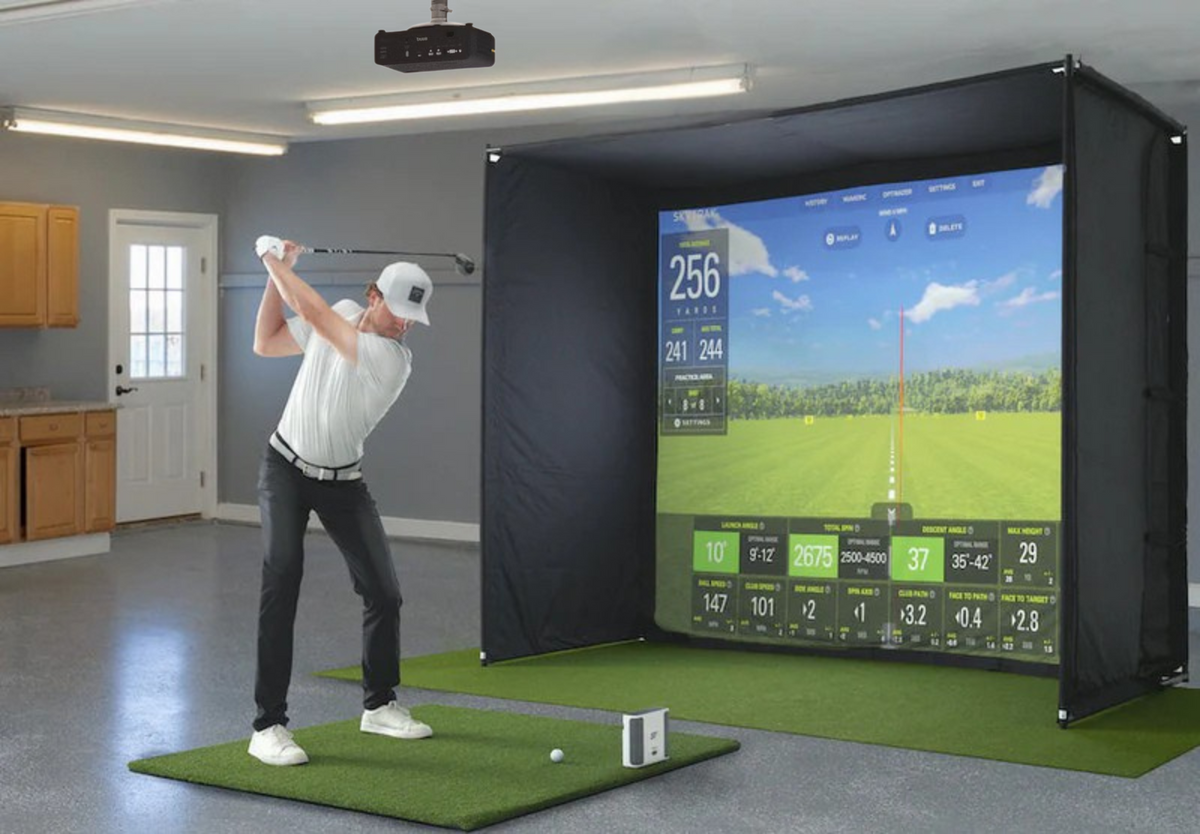
A build-your-own simulator allows you to select the components individually.
Depending on your setup, you may choose:
- Launch monitor
- Enclosure
- Impact screen
- Projector
- Gaming PC
- Hitting mat
- Landing turf
- Ceiling mount
- Golf simulator software
- Accessories
You have complete control over what goes into your simulator.
For example, you could choose a premium launch monitor while using a more budget-friendly projector, or select a particular enclosure size to fit an unusual room.
The result is a simulator built specifically around your preferences.
What Is a Pre-Curated Golf Simulator Package?
A pre-curated golf simulator package is a combination of components that has already been selected as a system.
Rather than starting with dozens of individual decisions, you begin with a package designed around a particular:
- Budget
- Launch monitor
- Enclosure
- Screen size
- Projector
- Performance level
- Room type
- Use case
The major components are selected with compatibility and overall performance in mind.
This can significantly simplify the buying process, especially if you're purchasing your first golf simulator.
Build Your Own vs. Pre-Curated Package
| Build Your Own | Pre-Curated Package | |
|---|---|---|
| Customization | Maximum | High |
| Research Required | More | Less |
| Component Selection | You choose everything | Major components are selected |
| Compatibility Research | Your responsibility | Components are curated together |
| Budget Control | Maximum | Easier to establish |
| Shopping Process | More decisions | Simplified |
| Best For | Experienced buyers | First-time & convenience-focused buyers |
| Flexibility | Maximum | Depends on package |
Neither approach is inherently better. The right option depends on how much control you want over the buying process.
Build Your Own Golf Simulator
The Advantages
1. Maximum Customization
The biggest advantage of building your own simulator is control.
You can choose exactly what you want for every component.
Maybe you want:
- A specific launch monitor
- A premium 4K projector
- A particular enclosure
- A specific hitting mat
- A high-performance gaming PC
You aren't restricted to a predetermined configuration.
This is particularly useful if you have specific preferences or already know exactly what you want.
2. Control Where You Spend Your Money
Building your own system allows you to prioritize the components that matter most to you.
For example, you might decide that the launch monitor is the most important part of the simulator and allocate more of your budget there.
Another golfer might prioritize the visual experience and spend more on a projector and gaming PC.
With a custom build, you decide.
3. Use Existing Equipment
A build-your-own approach can also make sense if you already own some components.
You may already have:
- A gaming PC
- Projector
- Hitting mat
- TV
- Computer
- Tablet
If that equipment meets your requirements, you may be able to build around it rather than purchasing everything again.
4. Ideal for Unique Spaces
Not every simulator room is a simple rectangle.
You may have:
- A narrow room
- Low ceilings
- Garage door tracks
- Bulkheads
- Windows
- Columns
- Multiple hitting positions
A custom build gives you more flexibility to work around those challenges.
Build Your Own Golf Simulator
The Challenges
1. More Research
The biggest downside is the amount of research involved.
You need to understand how the different components interact.
For example:
Launch Monitor → Software → PC → Projector → Screen
Each part has its own requirements.
You may need to research:
- Software compatibility
- PC specifications
- Projector throw distance
- Screen dimensions
- Aspect ratio
- Mounting requirements
- Room clearance
For some people, this is part of the fun. For others, it's overwhelming.
2. Compatibility Is Your Responsibility
Just because two products are excellent individually doesn't mean they're the right combination.
Before buying, verify:
- Launch monitor/software compatibility
- PC/software requirements
- Projector/screen compatibility
- Projector throw distance
- Screen dimensions
- Available mounting locations
A mistake here can mean replacing equipment after you've already purchased it.
3. More Decisions
A custom build gives you more choices but that's also the downside.
Instead of deciding between several complete packages, you may be comparing:
- Multiple launch monitors
- Dozens of projectors
- Several enclosure sizes
- Multiple PCs
- Different mats
- Different software platforms
The number of possible combinations can quickly become overwhelming.
Pre-Curated Golf Simulator Packages
The Advantages
1. Start With a Proven Configuration
The biggest advantage of a pre-curated package is that you don't have to start from scratch.
The major components have already been selected around a specific setup.
This can make the process much easier for someone who knows they want a golf simulator but isn't sure which products to combine.
2. Less Research
Instead of researching every component individually, you can focus on the decisions that matter most.
For example:
1. Choose your launch monitor.
2. Choose your enclosure size.
3. Choose your projector level.
4. Add to your package.
The underlying components have already been selected to create a cohesive system.
3. Easier to Understand Your Total Investment
A curated package makes it easier to establish a realistic budget.
Instead of adding up dozens of individual products, you can start with a complete configuration and make adjustments based on your budget.
For example:
Entry-level package
Focuses on providing the core simulator experience at a lower investment.
Mid-range package
Adds higher-performance equipment and additional features.
Premium package
Uses premium launch monitors, projectors, PCs, enclosures, and other components.
4. Less Risk of Compatibility Issues
A major benefit of a curated package is having someone consider the system as a whole.
The launch monitor needs to work with the software.
The PC needs to support the software.
The projector needs to work with the screen and room.
The enclosure needs to fit the space.
The hitting area needs to accommodate the golfer.
Thinking about the entire system helps avoid purchasing decisions that don't work well together.
Does a Pre-Curated Package Mean You Can't Customize It?
Not necessarily.
This is one of the biggest misconceptions about golf simulator packages.
A package doesn't have to mean: "Here's one setup. Take it or leave it."
A good pre-curated package can provide a starting point while still allowing you to customize the major components.
For example, you may be able to select:
- Your launch monitor
- Enclosure size
- Projector quality
- Gaming PC
- Hitting mat
- Turf
- Accessories
This gives you many of the benefits of a custom build while reducing the amount of research required.
Which Option Gives You More Control?
Build Your Own
If maximum control is your priority, building your own system gives you the most flexibility.
You choose every component and can create virtually any combination that fits your requirements.
Pre-Curated Package
A curated package provides a more guided approach.
You're still making important choices, but you don't have to start with an empty shopping cart.
For many golfers, this provides a good balance between customization and simplicity.
Which Option Is More Affordable?
There isn't a universal answer.
A custom build can potentially be less expensive because you can shop around and allocate your budget exactly where you want it.
However, a pre-curated package can also provide value by helping you avoid incompatible components and unnecessary purchases.
The important thing is to compare the complete system, rather than simply comparing the price of individual products.
For example, a lower-priced projector isn't necessarily a better value if it doesn't work with your screen size or available throw distance.
Likewise, a cheaper gaming PC isn't necessarily a good deal if it can't run your chosen simulator software at the resolution you want.
Which Is Better for a First-Time Buyer?
For someone purchasing their first golf simulator, a pre-curated package can make the process considerably easier.
Instead of learning every technical specification before making a purchase, you can start with a configuration designed around your needs and then customize it from there.
A custom build can still be an excellent option if you're comfortable researching technology and want complete control.
Which Is Better for an Experienced Golf Simulator Buyer?
If you've already owned a simulator or have extensive knowledge of launch monitors, projectors, and simulator software, building your own system may make more sense.
You'll likely already understand:
- Projector throw ratios
- Software compatibility
- PC requirements
- Launch monitor differences
- Screen dimensions
- Enclosure requirements
That knowledge makes it easier to create a highly customized setup.
Common Mistakes With Custom Builds
If you're building your own simulator, avoid these common mistakes.
Buying the Projector First
Your room and screen should influence your projector choice.
Choosing a Launch Monitor Without Checking Software
Make sure the launch monitor supports the software you want to use.
Forgetting PC Requirements
Higher-resolution graphics and demanding simulator software can require significant PC performance.
Not Measuring Your Room
Your available width, depth, and ceiling height affect virtually every component.
Ignoring Left- and Right-Handed Play
If multiple golfers will use the simulator, make sure the hitting area and launch monitor accommodate everyone.
Forgetting Accessories
Cables, mounts, turf, adapters, and other small components can add up.
Common Mistakes With Pre-Curated Packages
Packages simplify the process, but you should still evaluate what's included.
Assuming Every Package Fits Your Room
Always check the required room dimensions.
Looking Only at the Package Price
Understand exactly what is included.
Assuming Every Package Includes a PC
Some packages may require you to add a computer separately.
Not Checking Software
Make sure the launch monitor and included equipment support the software you want to use.
Choosing Based Only on the Launch Monitor
The launch monitor is important, but the overall simulator experience depends on the projector, screen, PC, hitting surface, and room.
Build Your Own or Choose a Package?
Build Your Own If:
✔ You want maximum customization.
✔ You enjoy researching equipment.
✔ You already own some simulator components.
✔ You have a unique room that requires a custom solution.
✔ You know exactly which products you want.
✔ You are comfortable verifying compatibility.
Choose a Pre-Curated Package If:
✔ You are building your first simulator.
✔ You don't want to research every component individually.
✔ You want help selecting compatible equipment.
✔ You have a specific budget.
✔ You want a simpler buying process.
✔ You still want the ability to customize important components.
The Middle Ground: Build Your Own Package
For many golfers, the best approach isn't choosing between a completely DIY simulator and a fixed package.
It's building your own customized package from a curated selection of compatible components.
This approach gives you the ability to choose the equipment that matters most to you while having the major compatibility decisions already considered.
At PinPoint Golf Sims, our Simulator Builder is designed around this concept.
You can select:
1. Your Launch Monitor
Choose the launch monitor that fits your goals and budget.
2. Your Enclosure
Choose the enclosure size that works with your room.
3. Your Projector
Select the level of visual performance you want.
4. Build Your Package
Add the components together to create a simulator tailored to your setup.
This provides more flexibility than simply buying a fixed package while avoiding the need to research every component from scratch.
Frequently Asked Questions
Is it better to build your own golf simulator?
It depends on your experience, budget, room, and desired level of customization. Building your own provides maximum flexibility, while a curated package simplifies equipment selection and compatibility.
Are golf simulator packages customizable?
Many packages can be customized. Depending on the package, you may be able to choose the launch monitor, enclosure size, projector, PC, hitting mat, turf, and other components.
Is a pre-built golf simulator package cheaper?
Not necessarily. A package can simplify budgeting and reduce the risk of purchasing incompatible equipment, but total pricing depends on the components included.
Can I mix brands in a golf simulator?
Yes. Many golf simulator systems use components from different manufacturers. However, you should verify compatibility between your launch monitor, software, PC, projector, enclosure, and other equipment.
Can I use my own PC or projector with a simulator package?
In many cases, yes, provided the equipment meets the requirements of the other components. Existing equipment can often be incorporated into a customized simulator configuration.
What should I choose for my first golf simulator?
If you're new to golf simulators, starting with a pre-curated package can simplify the process. You can then customize the components based on your room, budget, and playing goals.
Final Thoughts
Choosing between a build-your-own golf simulator and a pre-curated golf simulator package ultimately comes down to how much control and research you want to take on.
A custom build gives you maximum flexibility and can be ideal for experienced buyers who know exactly what they want.
A pre-curated package makes the process easier by giving you a starting point with compatible components selected around a particular setup.
But you don't necessarily have to choose one or the other.
A customized, pre-curated package can give you the best of both approaches: the ability to choose the equipment that fits your needs while having the major compatibility and configuration decisions already considered.
At PinPoint Golf Sims, you can build a simulator around your space, your budget, and the way you play. Choose your launch monitor, enclosure, projector, and other components to create a setup that's customized to you without having to start from scratch.
Share:
10 Golf Simulator Mistakes to Avoid Before You Buy (2026 Buyer's Guide)
Best Golf Simulator Under $5,000 in Canada