

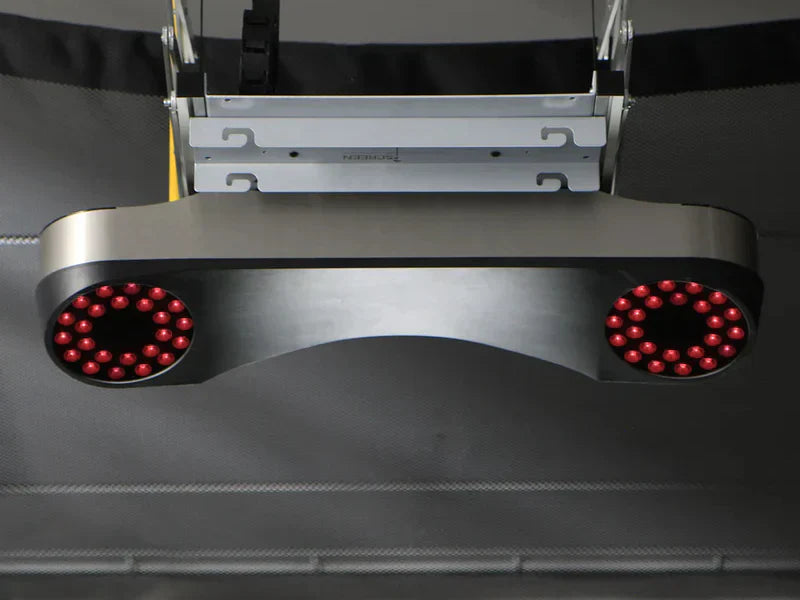
If you're shopping for a golf simulator or launch monitor, one of many decisions you'll make is choosing between camera-based and radar-based technology.
Both can deliver excellent performance, but they work very differently. The best choice depends on where you'll use your launch monitor, how much space you have, your budget, and what you want to improve in your game.
In this guide, we'll explain the differences between camera and radar launch monitors, compare their strengths and weaknesses, and help you determine which option is the best fit for your golf simulator.
Quick Comparison
| Feature | Camera Launch Monitors | Radar Launch Monitors |
|---|---|---|
| Best For | Indoor golf simulators | Outdoor practice and driving ranges |
| Accuracy Indoors | Excellent | Good to Excellent (depends on space) |
| Accuracy Outdoors | Excellent | Excellent |
| Ball Tracking | High-speed cameras | Doppler radar |
| Club Data | Excellent (many models) | Good to Excellent |
| Space Required | Minimal | More ball flight required |
| Left & Right-Handed Golfers | Excellent with overhead models | Usually requires repositioning unless centered |
| Typical Price | Mid to Premium | Entry-level to Premium |
How Do Camera Launch Monitors Work?
Camera launch monitors use one or more high-speed cameras to capture detailed images of the golf ball and club immediately after impact.
Within milliseconds, the cameras analyze hundreds or even thousands of images to calculate data such as:
- Ball speed
- Launch angle
- Spin rate
- Carry distance
- Side spin
- Club path
- Face angle
- Impact location (on supported models)
Because cameras only need to see the first few inches of ball flight, they perform exceptionally well indoors.
Popular Camera Launch Monitors
How Do Radar Launch Monitors Work?
Radar launch monitors use Doppler radar to track the golf ball as it travels through the air.
Instead of taking photographs, radar continuously measures the ball's movement to calculate launch conditions and ball flight.
This technology has been trusted on professional tours for years and excels when the ball has enough flight distance to be tracked.
Popular Radar Launch Monitors
- Garmin Approach R10
- Rapsodo MLM2PRO (both camera and radar)
- Trackman iO (uses Optically Enhanced Radar Tracking with additional optical technology)
- SkyTrak ST MAX (both camera and radar)
Camera vs Radar: Indoor Performance
If you're building a home golf simulator, indoor performance is usually the deciding factor.
Camera Advantages Indoors
Camera systems don't require the golf ball to travel very far before collecting accurate measurements.
Benefits include:
- Excellent spin measurement
- Consistent shot data
- Works well in smaller rooms
- Less affected by limited ball flight
- Ideal for permanent simulator installations
If your simulator is in a basement, garage, or spare room, a camera-based launch monitor is often the easiest solution.
Radar Advantages Indoors
Radar systems can still perform very well indoors, but many require more distance behind the golfer and in front of the ball.
The more ball flight the radar can observe, the more data it has available.
If your room is shorter than recommended, accuracy may decrease depending on the model.
Many modern radar launch monitors compensate for limited space using advanced algorithms, but adequate room dimensions remain important.
Camera vs Radar: Outdoor Performance
When practicing outside, the comparison changes.
Radar systems truly shine at the driving range because they can follow the golf ball for a much longer distance.
Advantages include:
- Full ball flight tracking
- Great for range sessions
- Easy portability
- Practice almost anywhere
Camera launch monitors also work outdoors, but some models perform best in controlled lighting conditions and may require careful setup.
Which Is More Accurate?
The answer depends on where you're playing.
Indoors
Camera launch monitors generally have the advantage because they directly capture the ball and club at impact without relying on extended ball flight.
Outdoors
High-end radar systems are exceptionally accurate outdoors because they can monitor nearly the entire flight of the golf ball.
Premium camera systems are also extremely accurate, making both technologies excellent choices when used in the right environment.
Space Requirements
One of the biggest differences between these technologies is the amount of space they need.
Camera Systems
Typically require:
- Less room behind the golfer
- Less ball flight
- Smaller overall simulator footprint
This makes them ideal for garages and basements.
Radar Systems
Usually require:
- Additional space behind the golf ball
- More ball flight in front of the golfer
- Proper alignment
Always check the manufacturer's recommended room dimensions before purchasing.
Left-Handed and Right-Handed Golfers
If multiple golfers will be using your simulator, this can be an important consideration.
Overhead Camera Systems
Products like the Uneekor EYE XO2, ProTee VX and VTrack remain mounted above the hitting area.
Advantages include:
- No moving the launch monitor
- Fast player changes
- Great for families
- Excellent for commercial simulators
Portable Radar Systems
Many radar units sit behind the golfer.
If left- and right-handed golfers alternate, setup may require repositioning or recalibration depending on the model.
Camera vs Radar Price Comparison
Radar launch monitors are available across a wide range of price points.
Examples include:
- Garmin Approach R10
- Rapsodo MLM2PRO
Camera launch monitors generally start at a higher price but often provide additional club data and are optimized for dedicated indoor golf simulators.
The right choice depends on your budget and intended use.
Which Launch Monitor Should You Choose?
Choose a Camera Launch Monitor if:
✔ Your simulator will be indoors year-round
✔ You want the highest level of indoor accuracy
✔ You have limited room depth
✔ You want an overhead installation
✔ You frequently switch between left- and right-handed golfers
Choose a Radar Launch Monitor if:
✔ You practice both indoors and outdoors
✔ You visit the driving range regularly
✔ You want maximum portability
✔ You're looking for an affordable entry into golf simulation
Frequently Asked Questions
Are camera launch monitors more accurate than radar?
Not necessarily. Both technologies are highly accurate when used in the environments they were designed for. Camera systems often have an advantage indoors, while radar systems excel outdoors with full ball flight.
Can radar launch monitors be used indoors?
Yes. Many radar launch monitors perform well indoors, provided you have enough space for the unit to track the golf ball properly. Always follow the manufacturer's room dimension recommendations.
Which launch monitor is best for a garage simulator?
Many homeowners choose camera-based systems because they require less space and deliver consistent indoor performance. Radar systems can also work well in garages with sufficient room depth.
Which launch monitor is best for beginners?
If you want a portable solution for both the driving range and home practice, an entry-level radar launch monitor can be an excellent choice. If you're building a dedicated indoor simulator, a camera-based system may provide the best long-term experience.
Final Thoughts
Choosing between a camera and radar launch monitor isn't about which technology is universally better. It's about choosing the one that best fits your space, budget, and how you plan to play.
If your goal is a dedicated indoor golf simulator with exceptional accuracy and minimal setup, a camera-based launch monitor is often the preferred option.
If you want a portable device that performs at both the driving range and in your simulator, a radar-based launch monitor may be the better fit.
Still unsure which launch monitor is right for your setup? Our team can help you compare your options and recommend a golf simulator package that matches your room dimensions, playing style, and budget.
Share:
Do You Need A Gaming PC For A Golf Simulator?
Best Golf Simulator Software (2026): GSPro vs E6 Software vs Awesome Golf vs Trackman vs FSX Play