

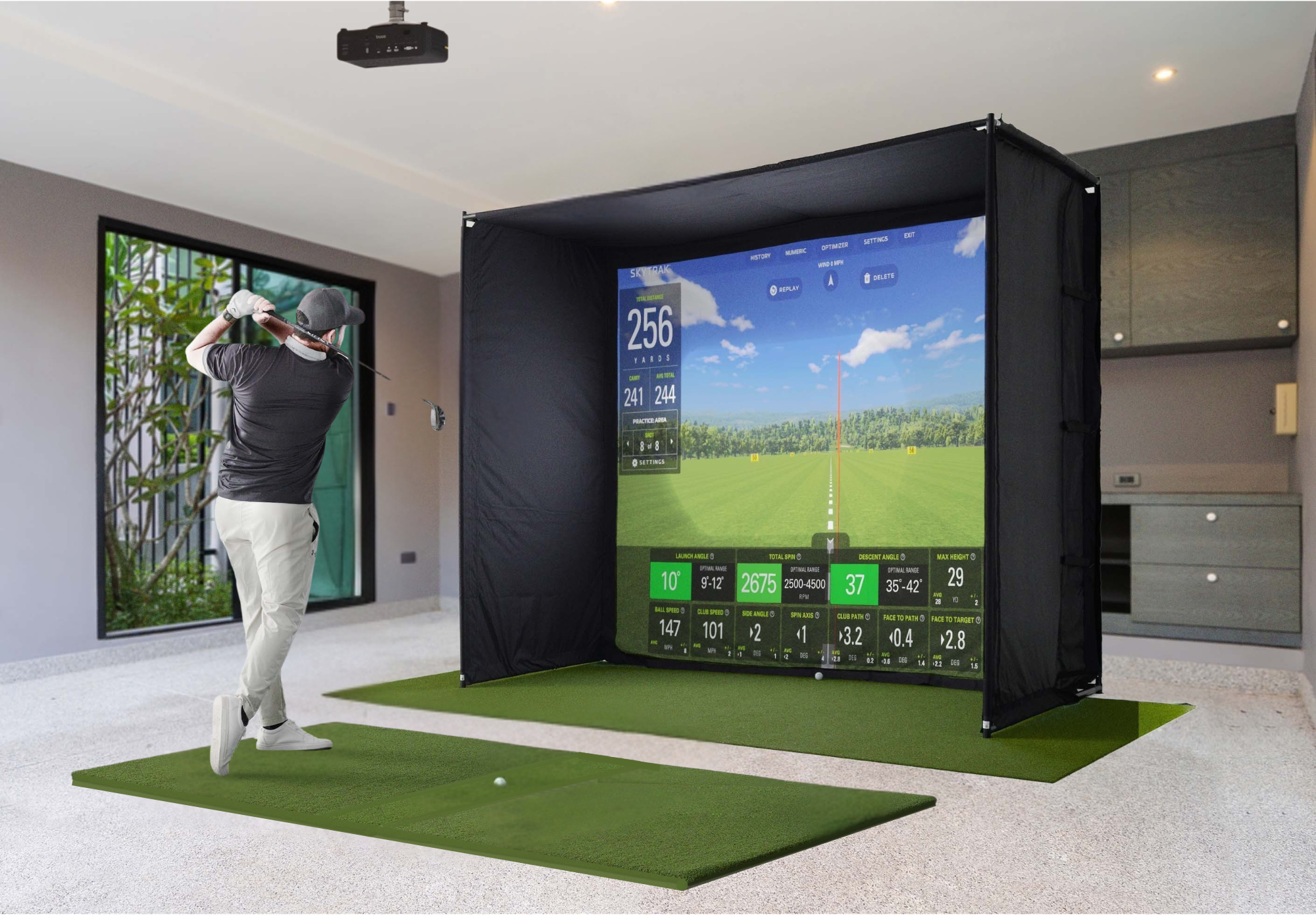
If you are planning an indoor golf setup, room size is usually the first thing that decides what is possible. Before you compare launch monitors, enclosures, projectors, or simulator packages, you need to know what your space can realistically support.
That matters because a golf simulator does not just need enough room to physically fit. It also needs enough room to let you swing comfortably, position the equipment properly, and create a setup you will actually enjoy using over time.
For most Canadian home setups, a practical starting point is around 9 feet high, 10 feet wide, and 15 feet deep. A more comfortable setup is closer to 10 feet high, 12 to 15 feet wide, and 16 to 18 feet deep. If you want more flexibility, easier upgrades, or both right- and left-handed play, larger is better.
The good news is that you do not always need a huge room. What you do need is the right match between your space, your goals, and the gear you choose. That is where smart planning matters more than chasing the biggest setup possible.
Minimum Vs Comfortable Golf Simulator Room Size
There is a big difference between a room that can technically work and a room that feels good to use. That is one of the most important things buyers miss when they first start planning a simulator.
The Minimum Space That Can Work
A tight but workable golf simulator room is often around 9 feet high, 10 feet wide, and 15 feet deep. Some golfers can make that work, especially with a compact setup and the right launch monitor.
That said, minimum dimensions are rarely ideal. A room at the lower end of the range can feel restrictive, especially with a driver in hand. It may also limit screen size, hitting position, and future upgrade options.
The Comfortable Space Most Golfers Want
For most home users, a more comfortable target is around 10 feet high, 12 to 15 feet wide, and 16 to 18 feet deep. This gives you more room to swing naturally and more flexibility in how the simulator is built.
It also makes it easier to fit a proper enclosure, choose from more launch monitor types, and create a setup that feels less cramped over time. If you are investing in a simulator you plan to use regularly, comfort matters.
The Ideal Range For Long-Term Flexibility
If your room is around 10 feet high, 15 feet wide, and 18 feet deep or more, you have a lot more freedom. That kind of space supports fuller builds, centred hitting, both-handed use, and more choices across monitors, screens, and projectors.
Not every buyer needs that much room. But if you have it, it makes the planning process much easier and reduces compromise.
Ceiling Height Usually Decides Everything First
Most buyers focus on floor space first, but ceiling height is often the real deal-breaker. If the ceiling is too low, the rest of the setup becomes secondary very quickly.
Why Height Matters So Much
A golfer needs enough vertical clearance to make a natural swing, especially with longer clubs. Even when a player can technically avoid the ceiling, a low ceiling can still change the swing and make the setup feel uncomfortable.
That is why 9 feet is often seen as workable, while 10 feet is considered a stronger target for most golfers. The extra foot makes a big difference in confidence and comfort.
What Common Ceiling Heights Really Mean
At 8.5 feet, some golfers may be able to hit shorter clubs, but many will feel restricted. This height is usually too tight for a true full-swing setup unless the golfer and build are very specific.
At 9 feet, more golfers can use the space, but it is still wise to test carefully before buying. At 10 feet, most home users will feel much better. If you have 11 feet or more, you are in a very strong position for a full simulator build.
How To Test Height Properly
The best way to check height is simple. Stand where you plan to hit from and make full practice swings with your driver. Do not just test the centre of the room. Test the actual hitting zone.
Also check for garage door openers, rails, bulkheads, light fixtures, ceiling fans, and anything else that hangs lower than the main ceiling line. Those details matter more than the headline number.
Width Shapes Comfort, Centre Alignment, And Shared Use
Width is not only about avoiding the wall. It also affects how naturally you stand, whether you can centre your hitting area, and whether the simulator can work for more than one type of golfer.
How Much Width A Solo Golfer Needs
A single golfer can often work with less width than a shared setup. If only one right-handed player is using the simulator, you may be able to offset the hitting area and make a narrower room work.
Still, narrow rooms introduce trade-offs. You may feel boxed in, and your screen and enclosure options may become more limited.
Why Wider Rooms Are Easier To Plan
Once you get into the 12 to 15 foot width range, things start opening up. You have more room for a centred hitting position, more comfort during the swing, and fewer compromises around screen size and side protection.
This is also the range where the simulator starts to feel less like a workaround and more like a proper indoor hitting bay.
Width For Right- And Left-Handed Golfers
If both right- and left-handed players need to use the same simulator, width becomes even more important. Shared setups generally benefit from around 14 to 15 feet of width so both players can swing safely and comfortably.
That does not mean smaller rooms are impossible. It just means centred, both-handed play becomes harder as the room narrows.
Depth Depends On The Whole Setup, Not Just The Screen
Depth is often misunderstood because buyers think only about the distance from the ball to the screen. In reality, total room depth includes more than that.
What Depth Actually Has To Accommodate
A simulator room needs enough depth for the screen or enclosure, a buffer behind it, the hitting area, the golfer’s swing, and in some cases the launch monitor behind the player.
That is why a room that looks long enough on paper can still feel tight once the full setup is mapped out.
Why 16 To 18 Feet Deep Is So Common
For many home builds, 16 to 18 feet is a comfortable target because it leaves more room to position everything properly. It helps with screen safety, hitting distance, and overall feel.
That extra depth also becomes more important when using radar-based launch monitors or when trying to fit a more immersive enclosure and projector setup.
When A Shorter Room Can Still Work
If your room is closer to 15 feet deep, you may still be able to build a very usable simulator. The key is choosing equipment that fits tighter spaces and avoiding a setup that demands more ball flight or rear monitor distance.
This is where product choice matters a lot. A shallower room does not always mean no simulator. It usually means a narrower range of smart options.
Your Launch Monitor Type Changes Your Space Needs
Not all launch monitors fit the same kind of room. Some are more forgiving in tighter spaces, while others need more depth to perform properly.
Camera-Based Monitors In Tighter Rooms
Camera-based launch monitors are often a better fit for shallower spaces because they measure impact quickly and usually do not need as much distance behind the player.
That makes them attractive for basements, spare rooms, and compact garage builds where every foot matters.
Radar-Based Monitors Need More Depth
Radar-based systems usually need more room behind the hitting area and more space in front of the ball as well. In the right room, they can be an excellent choice. In a tighter room, they can create planning headaches quickly.
This is one of the biggest reasons room measurements should come before product selection, not after.
Overhead Systems And Cleaner Floor Layouts
Overhead launch monitors can be very appealing because they help keep the floor area cleaner and can work well in dedicated bays. They can also support a more refined permanent build.
But overhead systems still depend on ceiling height, mounting position, and room design. They are not a shortcut around space limitations.
Common Room Types Need Different Planning
Most home simulators go into garages, basements, or spare rooms. Each type of space has its own strengths and constraints.
Garage Golf Simulator Setups
Garages are popular because they often offer decent width and depth. They can be a great fit for home simulator builds, especially if you want a dedicated area.
The main issues are usually ceiling-mounted garage door hardware, colder temperatures, concrete flooring, and the need to balance parking or storage with golf use. A garage can work very well, but the details matter.
Basement Golf Simulator Setups
Basements are common in Canada, but they often come with lower ceilings, bulkheads, beams, or awkward layouts. These are usually the first things to check before anything else.
If the height works, a basement can be an excellent simulator space. If the height is marginal, you may need to shift toward a more compact or practice-focused setup.
Spare Room Or Bonus Room Setups
Spare rooms can work nicely for compact builds, especially when the goal is skill work, convenience, or year-round practice rather than a full theatre-style simulator experience.
These rooms may have tighter width or depth, so product selection becomes even more important. In many cases, the smartest setup is the one designed around the room, not forced into it.
What To Do If Your Room Is Smaller Than Ideal
Not every home has perfect simulator dimensions. That does not mean you should give up. It just means you need to plan honestly.
Prioritise The Right Things
If space is limited, the first priority should be safe and comfortable swing clearance. After that, focus on choosing a launch monitor that suits the room and building around the most important parts of the experience.
You may need to accept a smaller screen, a net instead of a full enclosure, or a setup that is stronger for irons than driver. Those trade-offs are often better than buying the wrong gear for the room.
Avoid The Wrong Compromises
What you should not do is ignore launch monitor requirements, force an unsafe swing, or assume a tight room will somehow feel bigger once the simulator is installed.
Good simulator planning is really about matching expectations to reality. A realistic compact setup is better than an overbuilt setup that never feels right.
Screen, Enclosure, And Projector Choices Depend On The Room
Room size does not only affect whether a simulator fits. It also affects how the simulator looks, feels, and performs.
Bigger Screens Need More Than Extra Width
A larger screen usually requires the right aspect ratio, proper side clearance, and enough depth for the enclosure and hitting position. It is not just a matter of fitting a wider piece of material on the wall.
That is why screen planning should happen after you understand the full room dimensions and hitting layout.
Projector Planning Should Happen Early
Projectors are often treated like an add-on, but they affect placement, throw distance, image size, and shadow management. In a home simulator, those details matter more than many buyers expect.
If the projector is part of your plan, it should be considered early, not after the enclosure and hitting area are already decided.
Why PinPoint Golf Sims Takes A Space-First Approach
At PinPoint Golf Sims, the goal is not to push the biggest package possible. The goal is to help Canadian golfers build a setup that actually fits their space, goals, and budget.
That is why we take a compatibility-first approach. Room size comes first. Then comes the right launch monitor, enclosure or net, projector, and supporting gear. It is a more practical way to build, especially for home users and DIY buyers.
PinPoint Golf Sims is a Canadian-owned indoor golf shop focused on helping golfers build and upgrade home simulator setups with curated gear and compatibility-first guidance. We keep the catalogue focused, avoid unnecessary clutter, and help buyers choose equipment that works together in real spaces.
For many golfers, that means starting with a garage, basement, or spare room and building around what is realistic. Sometimes that means a full simulator package. Sometimes it means starting with the essentials and upgrading over time.
How Much Space Do You Really Need?
The real answer depends on what kind of simulator you want to build and how much compromise you are willing to accept. But for most buyers, the practical answer looks like this.
A very tight setup may work around 9 feet high, 10 feet wide, and 15 feet deep. A more comfortable setup is closer to 10 feet high, 12 to 15 feet wide, and 16 to 18 feet deep. If you want more freedom, more monitor options, or both right- and left-handed play, larger dimensions will make life easier.
The most important thing is not chasing a generic number from the internet. It is understanding what your room can support and choosing equipment that matches it. That is how you avoid wasted money, frustrating compromises, and a setup that never feels quite right.
Frequently Asked Questions
What Is The Minimum Room Size For A Golf Simulator?
A practical minimum is often around 9 feet high, 10 feet wide, and 15 feet deep. Some golfers can make that work, but it depends on swing size, room layout, and the equipment being used.
Is 9 Feet High Enough For A Golf Simulator?
For many golfers, 9 feet can work, but it is close to the lower end. It is important to test with a driver in the exact hitting area before committing to a purchase.
How Wide Should A Golf Simulator Room Be?
Around 12 to 15 feet wide is a strong target for comfort. If both right- and left-handed golfers will use the simulator, wider rooms are usually easier to plan.
How Deep Does A Golf Simulator Room Need To Be?
A room around 16 to 18 feet deep is comfortable for many home setups. Some smaller builds can work in about 15 feet, but equipment choice becomes more important.
Can I Put A Golf Simulator In My Garage?
Yes, many home simulators go into garages. You just need to check ceiling clearance, garage door hardware, floor conditions, and how much permanent space you can dedicate to the setup.
Can I Build A Golf Simulator In A Basement?
Yes, but basements need careful checking for ceiling height, beams, bulkheads, and other obstacles. Height is usually the first issue to confirm.
Do Radar Launch Monitors Need More Room?
In general, yes. Radar-based launch monitors usually need more depth than many camera-based options, so they tend to fit better in longer rooms.
What If My Room Is Too Small For A Full Simulator?
You may still be able to create a very useful setup by choosing space-friendly equipment, reducing screen size, using a net, or focusing on a practice-first build rather than a full immersive simulator.
Share:
How Accurate Are Golf Simulators?
Do You Need A Gaming PC For A Golf Simulator?